


















































Certification Courses
Hands-On Labs
Threat Intelligence
Latest Cyber News
MITRE ATT&CK Breakdown
All Cyber Keywords
Have you ever wondered how your browser knows it's safe to enter your password on a website? Or how your banking app ensures no one can eavesdrop on your transactions? The answer lies in a small but powerful digital document called an X.509 certificate.
An X.509 certificate is like a digital passport that proves a website's identity and enables encrypted communication. Imagine trying to verify someone's identity without seeing their face – that's what computers do millions of times daily with these certificates.
In this guide, you'll learn: what X.509 certificates actually are, why they're critical for online security, how they work in everyday scenarios, common mistakes that lead to security breaches, and best practices to ensure your connections remain secure and protected.
When you visit a website with "https://" in the address bar and see that little padlock icon, you're witnessing an X.509 certificate in action. This digital certificate is the cornerstone of internet security, silently working behind the scenes to protect your data from prying eyes.
Think of an X.509 certificate as a digital ID card issued by a trusted authority (like a government issues passports). It contains crucial information: who owns the website, who issued the certificate, when it expires, and a cryptographic key that enables encrypted communication. Without these certificates, online shopping, banking, email, and social media would be dangerously vulnerable to eavesdropping attacks and identity theft.
In the next sections, we'll break down this complex topic into digestible pieces. You'll understand how certificates work, why they sometimes fail (leading to those scary browser warnings), and how you can navigate the digital world more safely by understanding this fundamental security technology.
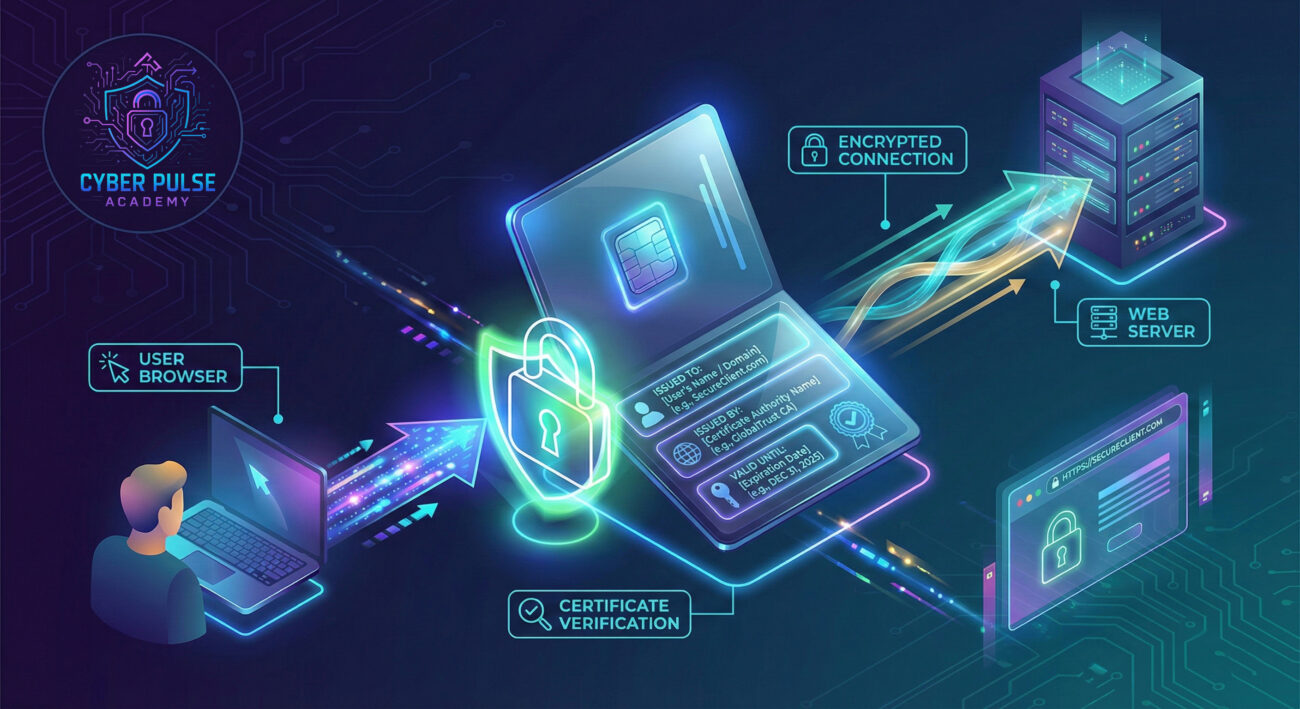
In our increasingly digital world, X.509 certificates have evolved from technical necessities to fundamental components of global trust. Every day, billions of certificates facilitate secure connections for everything from mobile banking to IoT devices in smart homes. According to recent statistics, over 2.8 billion certificates were active worldwide in 2023, with projections showing continued exponential growth.
The importance of X.509 certificates extends beyond just website security. They enable secure email communication (S/MIME), authenticate virtual private networks (VPNs), verify software updates, and even secure connected vehicles. When a certificate system fails, the consequences can be severe. For instance, the 2021 Microsoft Exchange Server vulnerabilities exploited certificate-related weaknesses, affecting thousands of organizations globally.
From a personal perspective, understanding X.509 certificates helps you recognize legitimate websites versus phishing attempts. When you see a valid certificate, you know the website has been verified by a trusted authority. When you see a certificate error, your browser is warning you about potential security risks. This knowledge empowers you to make safer choices online, protecting your personal information, financial data, and digital identity from increasingly sophisticated cyber attacks.
Let's break down the essential terminology surrounding X.509 certificates into simple, relatable concepts:
| Term | Simple Definition | Everyday Analogy |
|---|---|---|
| Certificate Authority (CA) | A trusted organization that issues and verifies digital certificates | Like a passport office that verifies your identity before issuing a passport |
| Public Key Infrastructure (PKI) | The complete system for creating, distributing, and managing digital certificates | The entire passport system: application, issuance, verification, and renewal processes |
| Encryption | The process of scrambling data so only authorized parties can read it | Like sending a letter in a locked box that only the recipient has the key to open |
| Man-in-the-Middle Attack | When an attacker secretly intercepts and possibly alters communication between two parties | Like a postal worker opening your mail, reading it, then resealing and sending it on |
| Certificate Validation | The process of checking if a certificate is legitimate, current, and from a trusted source | Like a bouncer checking your ID against a database of valid identifications |
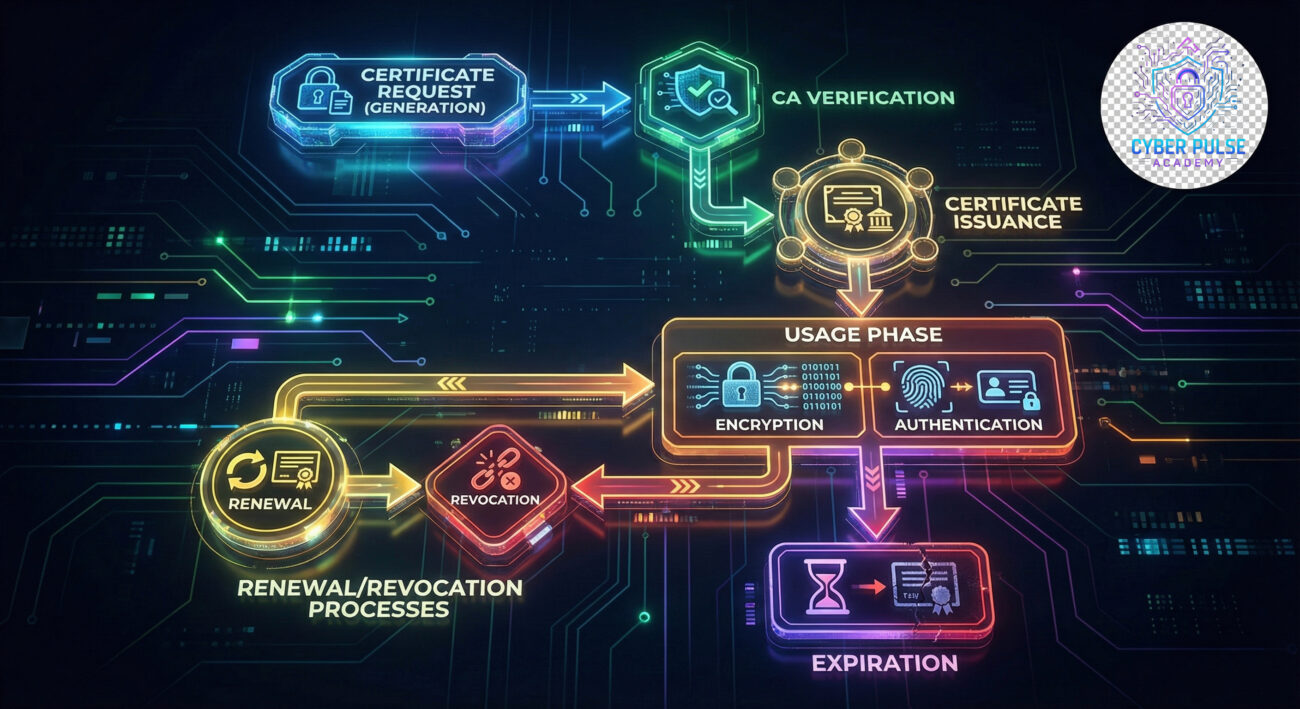
Let's follow Sarah, a freelance graphic designer, as she works from her favorite coffee shop. Sarah needs to send confidential design files to a client using a cloud service. This everyday scenario perfectly illustrates how X.509 certificates protect her data.
When Sarah connects to the coffee shop's public Wi-Fi, she's entering a potentially risky environment. Without proper security, other users on the same network could intercept her data. Fortunately, when she visits her cloud service (which uses HTTPS), her browser requests its X.509 certificate. The certificate proves the cloud service's identity and contains a public key that enables establishing an encrypted connection.
Here's what happens in sequence:
| Time/Stage | What Happened | Impact |
|---|---|---|
| 10:00 AM - Connection | Sarah's browser connects to cloudservice.com | Browser requests the site's X.509 certificate |
| 10:00:02 AM - Verification | Browser checks certificate against trusted CAs | Certificate validated as legitimate and current |
| 10:00:04 AM - Encryption Setup | Browser uses certificate's public key to establish encrypted session | All data between Sarah and cloud service now encrypted and secure |
| 10:05 AM - Data Transfer | Sarah uploads design files containing client's proprietary information | Even if intercepted, files are unreadable without the session key |
| 10:07 AM - Completion | Upload completes successfully | Client receives files without data breach or theft |
Without a valid X.509 certificate, Sarah's browser would display a warning, and she might have canceled the upload, protecting herself from potential data interception. This scenario demonstrates how certificates work silently but crucially in our daily digital interactions.
Follow these steps to ensure you're interacting safely with websites and understanding their certificates:
Always check that the website address begins with "https://" not just "http://". The 's' stands for secure. Also, look for the padlock icon in your browser's address bar. This indicates an encrypted connection protected by an X.509 certificate.
Click the padlock icon in your browser to view the certificate details. You can see who issued it, to whom, and its validity period.
Check that the certificate is issued to the organization you expect to be visiting. For example, a bank's certificate should be issued to that bank's domain, not a similar-looking name.
When your browser shows a certificate warning, pay attention! Common warnings include expired certificates, domain name mismatches, or untrusted issuers.
Combine certificate knowledge with other security practices for comprehensive protection.
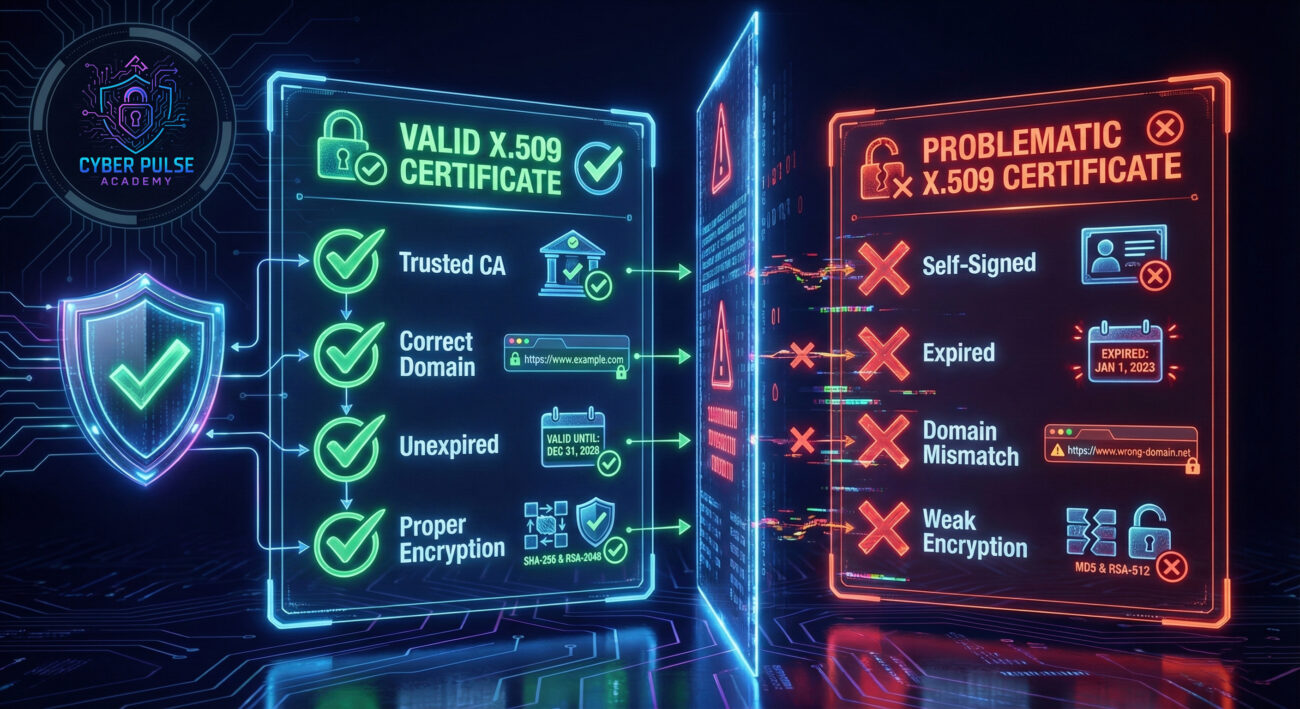
Attackers often target certificate systems because compromising them can provide widespread access. One common approach is the rogue certificate attack, where an attacker installs a malicious certificate on a victim's system or compromises a Certificate Authority.
Attack Path: An attacker might send a phishing email with a link to a website that has a valid-looking but fraudulent certificate. Alternatively, they might compromise a company's internal CA to issue legitimate-looking certificates for malicious domains. Once a system trusts the rogue certificate, the attacker can decrypt traffic, impersonate legitimate sites, and steal credentials.
Defender's Counter-Move: Security teams implement certificate pinning (where applications only accept specific certificates), monitor for unexpected certificate changes, and use certificate transparency logs to detect unauthorized certificates. Regular audits of trusted root certificates on endpoints also help identify and remove unauthorized issuers.
Attackers view X.509 certificates as both obstacles and opportunities. Certificates create encryption that's difficult to break, so attackers look for weaknesses in implementation instead. They search for expired certificates, misconfigured validation, or compromised Certificate Authorities. A successful certificate-related attack provides excellent camouflage since encrypted traffic looks legitimate. Attackers particularly love finding organizations that don't properly monitor their certificate inventory or ignore expiration warnings.
Defenders see X.509 certificates as fundamental trust anchors that need constant monitoring and management. The focus is on maintaining a complete inventory, ensuring timely renewals, validating certificate chains, and monitoring for anomalies. Defenders implement automated certificate management where possible, enforce strict policies about which CAs are trusted, and educate users about certificate warnings. The goal is maintaining the integrity of the trust chain while minimizing operational disruptions from certificate issues.
Understanding X.509 certificates is fundamental to navigating today's digital world safely. These digital passports form the foundation of trust for encrypted communications across the internet. Let's recap the key points:
As our digital lives become more interconnected, the role of X.509 certificates will only grow in importance. Whether you're an individual user, a business owner, or an IT professional, understanding these fundamentals helps you make safer decisions and implement better security practices.
Now that you understand X.509 certificates, you're better equipped to recognize secure connections and understand browser security warnings. Remember that cybersecurity is a continuous learning process.
Have questions about certificates or encountered a confusing security warning? Share your experiences in the comments below! Let's build a community of security-aware users who can navigate the digital world with confidence and knowledge.
For deeper learning, explore our guides on TLS encryption, public key cryptography, and cybersecurity fundamentals.
Every contribution moves us closer to our goal: making world-class cybersecurity education accessible to ALL.
Choose the amount of donation by yourself.